How to Export an XML Bank Statement from Raiffeisen (Moja eBanka biznis)
Step-by-step guide for paušalci: export your Raiffeisen business account transactions as an XML file you can upload to Preduzmi in under a minute.
Preduzmi reads Raiffeisen bank statements directly — but only in XML format. PDFs and screenshots won't work, and the TXT/XLS exports lack the structured fields we need. The good news: getting the XML takes about 30 seconds once you know where to click. This guide walks through it with screenshots, for both the web bank and the mobile app.
What you'll need
- Active Moja eBanka biznis access for your Raiffeisen business (dinar) account
- A computer with a browser (this is a web-only flow)
- The date range you want to import (usually "from start of current month" or "last 3 months")
The XML export is available only in the web banking at rol.raiffeisenbank.rs. The Raiffeisen mobile app is still useful — you may need it to confirm the web login (2FA push or one-time code) — but the XML download itself happens on the desktop.
Step 1 — Log in and open your dinar account
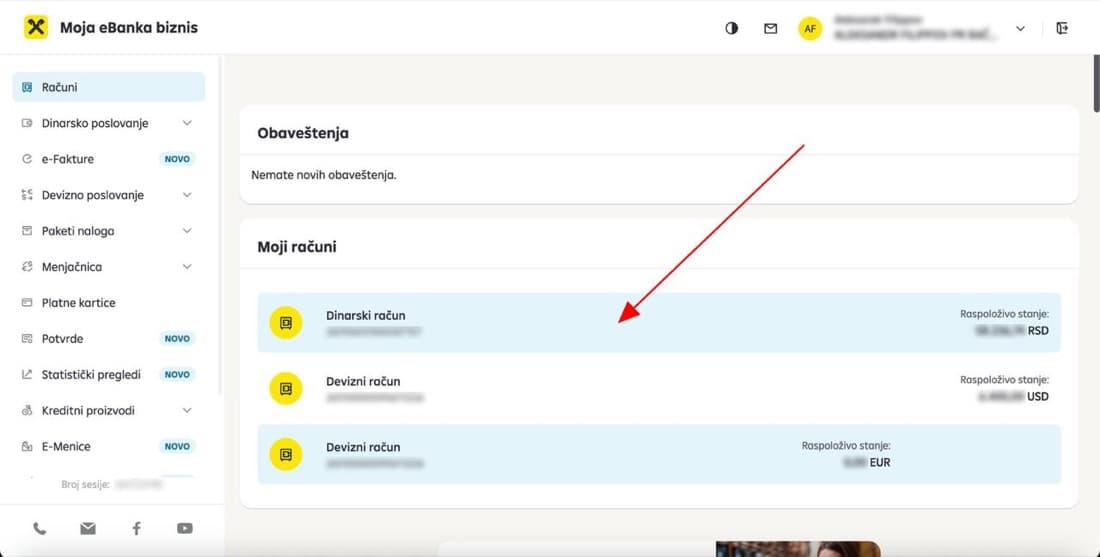
Sign in to Moja eBanka biznis. On the Računi (Accounts) screen, click your Dinarski račun (dinar account). Foreign-currency accounts (USD, EUR) use the same form, but for paušal tax reporting you only need the dinar account.
Step 2 — Set a date range, refresh, then download XML
You'll land on the Promet i transakcije (Transactions) view for that account. Three things to do, in order:
- Set the date range in the Od (From) and Do (To) fields. The default range only covers the last few days — widen it to cover the period you want to import.
- Click the refresh button (the yellow circular arrow on the right). This is the easy step to miss — without it the export uses the previous filter, not your new dates.
- Click XML in the row of export buttons (next to PDF / TXT / XLS). The browser downloads a
.xmlfile immediately. The filename is a long string of digits — that's fine, you don't need to rename it.
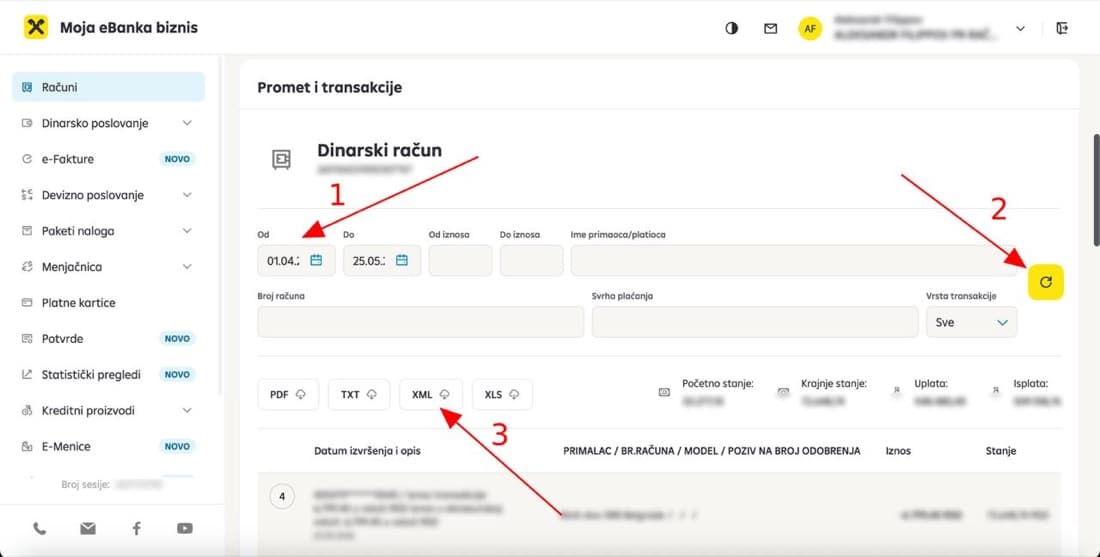
Don't skip the refresh step. If you change the dates and immediately click XML, Raiffeisen exports the previously loaded date range. The download succeeds silently — so the mistake is only visible later when transactions are missing in Preduzmi.
Step 3 — Upload it to Preduzmi
You have two equally fast ways to upload the file:
- From the dashboard — drag the
.xmlfile onto the Upload bank statement tile. The dashboard accepts XML directly, no extra clicks. - From the Transactions page — click Upload Raif. XML and drop the file.
Either path takes you through the same parser: Preduzmi reads every transaction, splits incoming from outgoing, and matches payee names automatically.
You can re-upload the same period as many times as you want — duplicate transactions are detected by their unique bank reference and skipped automatically.
Track your paušal obligations automatically
Revenue limits, tax payments, KPO entries — all in one dashboard.
Common questions
Why does Preduzmi only accept the XML export from Raiffeisen?
XML is a structured format with one canonical field per value (date, amount, currency, reference, payee), so parsing is deterministic. PDF, TXT, and XLS exports are formatted for human reading and lose or rearrange fields that Preduzmi needs to reconcile transactions accurately.
PDFs are the worst case: the same bank statement can be laid out a hundred different ways, and OCR errors on amounts or dates cause exactly the kind of bug you can't afford in tax reporting.
Can I import a TXT or XLS export instead?
Not the Raiffeisen TXT or XLS exports — they are formatted for human reading and skip fields Preduzmi needs. If you bank elsewhere and only have CSV available, use the Upload CSV option on the same Transactions page, where Preduzmi helps you map your columns.
What date range should I export from Raiffeisen?
Export whatever period you haven't imported yet. Preduzmi de-duplicates transactions by their unique bank reference, so it is safe to export overlapping ranges. A common pattern is to export from the 1st of last month to today, once a month.
Why are some transactions missing after I upload the XML?
The most common cause is skipping the refresh step in Moja eBanka biznis. If you change the Od / Do dates and immediately click XML, Raiffeisen exports the previously loaded date range, not the new one. Re-open the Promet i transakcije view, set the dates, click the yellow refresh button, then click XML.
The download succeeds silently, so the mistake is only visible later, when transactions are missing in Preduzmi.
Can I export XML from the Raiffeisen mobile app instead of the web?
No — the XML export is a web-banking feature. The Raiffeisen mobile app shows transactions but does not produce the structured XML statement Preduzmi needs. You may still need the mobile app to approve the web login (2FA push or one-time code), but the download itself happens on the desktop at rol.raiffeisenbank.rs.
Do I need to export transactions from my foreign-currency (EUR, USD) account?
Not for paušal tax reporting. Your KPO obligations are based on dinar account activity — that is where client payments and tax-relevant outflows live. Foreign-currency accounts can be imported too but are optional. The export form is identical for them.
Where to learn more
Raiffeisen's own help center has a short overview of the Pregled računa screen, including the same XML export button:
Pregled računa na Moja eBanka biznis — Raiffeisen Knowledge Base
If the export form doesn't look like the screenshots above, Raiffeisen has likely updated the UI — the official help page is the source of truth.
Written by Evgeny Smirnov — paušalni preduzetnik since 2022, with the help of AI.
Also read
KPO Knjiga Demystified: How to Track Revenue Correctly
Everything you need to know about Serbia's KPO book for paušal entrepreneurs: what goes in, what doesn't, foreign currency conversion, paper vs electronic format, and the 7 most common mistakes.
6 Million vs 8 Million: The Complete Guide to Serbian Paušal Revenue Limits
Understand the two revenue thresholds for Serbian paušal entrepreneurs: the 6M calendar-year limit and the 8M rolling 12-month PDV limit. Learn how each is calculated and what happens if you exceed them.
Preduzmi vs Excel: Why Spreadsheets Break Down for Paušal Compliance
Feature-by-feature comparison of managing paušal obligations with spreadsheets versus Preduzmi. Learn where manual tracking fails and when a dedicated tool makes the difference.
KPO Knjiga vs Bank Statement: Why the Two Totals Differ
Your KPO knjiga and your bank statement measure different things. The eight legitimate reasons the totals differ, why the 6,000,000 RSD limit counts invoices issued rather than payments received, and how to reconcile.