How to Export an XLS Bank Statement from Alta Banka (Promet po računu)
Step-by-step guide for paušalci: export your Alta Banka business account transactions as an Excel (XLS) file you can upload to Preduzmi in under a minute.
Preduzmi reads Alta Banka statements directly from the XLS (Excel) export of the Promet po računu ("Account turnover") report — the same screen you already use to review transactions on your account. No PDF, no screenshots, no manual retyping. Producing the file takes about 30 seconds once you know where to click, and Preduzmi auto-detects the Alta format the moment you upload it.
What you'll need
- Active ALTA eBiz (web e-banking) access for your Alta Banka business account(s) at altabanka.rs
- A computer with a browser (the XLS download is a web feature)
- The date range you want to import (usually "from start of current month" or "last 3 months")
The XLS export lives in ALTA eBiz, the web e-banking portal. The mBiz mobile app is handy for day-to-day balance checks and may be needed to confirm the web login (2FA push or one-time code) — but the Promet po računu export to Excel happens on the desktop.
Step 1 — Log in and open your account
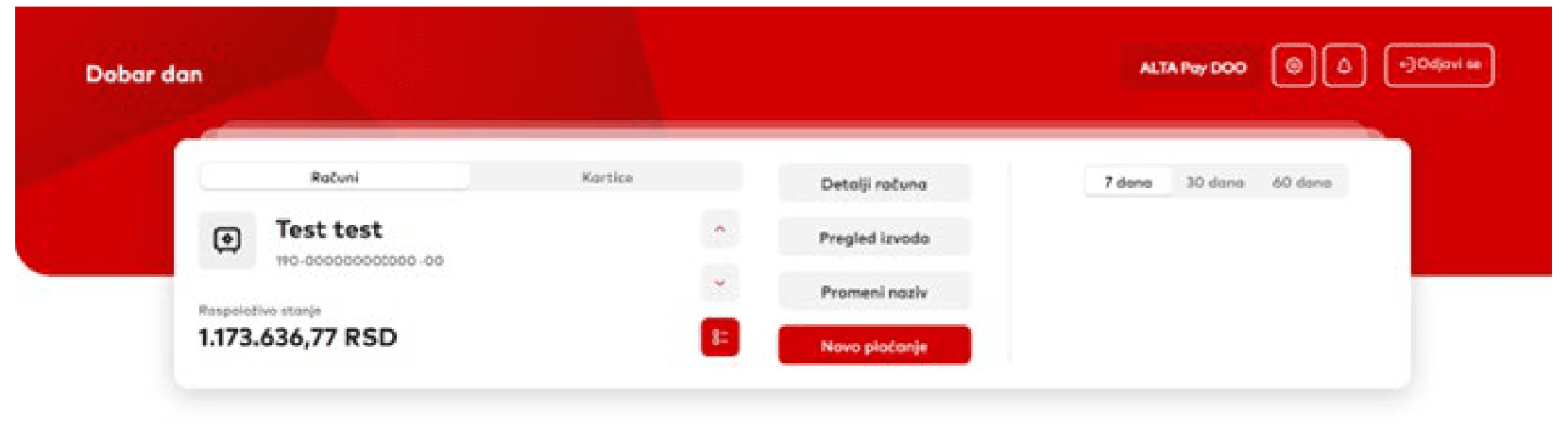
Sign in to ALTA eBiz. From the home screen (or the Računi / Accounts menu on the left), select the account you want to export. For complete accounting and bookkeeping, import all of your business accounts — your dinar (RSD) account and any foreign-currency (EUR, USD) accounts. Export each account separately; Preduzmi keeps every transaction's original currency.
Step 2 — Open Promet po računu, set the date range, download XLS
Open Promet po računu (Account turnover) for that account. Then, in order:
- Set the date range in the Od dana (From) and Do dana (To) fields. Don't worry about overlap — Preduzmi automatically skips any transactions you've already imported, so re-exporting a period you've partly imported is completely safe. You can optionally narrow the results by Od iznosa / Do iznosa (amount), Tip transakcije (transaction type), or Opis / Naziv primaoca (description / payee).
- Click the red arrow (►) to apply the filter and load the matching transactions into the table.
- Click the XLS button in the top-right corner (next to PDF). The browser downloads an
.xlsfile immediately. The filename is a long string of digits — that's fine, you don't need to rename it.
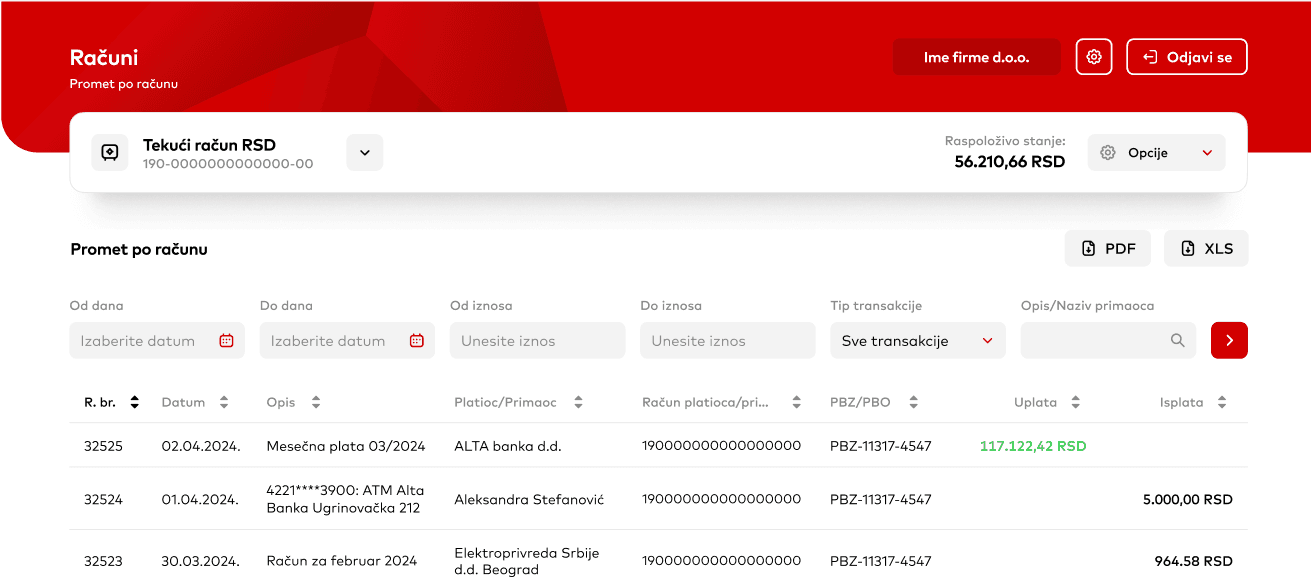
Use Promet po računu, not Pregled izvoda (statement list). Both can produce files, but Preduzmi parses the Promet po računu turnover report — that's the screen with the Od dana / Do dana filters and the PDF / XLS buttons shown above.
Alta only goes back about 6 months. The Promet po računu export covers roughly the last 6 months — Alta won't hand over a longer history. For transactions older than that, enter them manually on the Transactions page in Preduzmi; there's no way to export them from Alta.
Step 3 — Upload it to Preduzmi
You have two equally fast ways to upload the file:
- From the dashboard — drag the
.xlsfile onto the Upload bank statement tile. The dashboard auto-detects the Alta XLS directly, no extra clicks. - From the Transactions page — click Import → Alta (XLS) and drop the file.
Either path goes through the same parser: Preduzmi reads the Alta Promet po računu report directly, splits incoming (Uplata) from outgoing (Isplata), and matches payee names automatically.
You can re-upload the same period as many times as you want — duplicate transactions are detected by their unique bank entry id ("Vaš broj / Broj naloga") and skipped automatically.
Track your paušal obligations automatically
Revenue limits, tax payments, KPO entries — all in one dashboard.
Using the Alta desktop application instead
Alta also offers a desktop e-banking application (the installed Windows program), and it exports a different Excel file than the web ALTA eBiz portal. Preduzmi reads both — you upload the desktop app's Excel export exactly the same way, and Preduzmi auto-detects which Alta format it is.
If you work in the desktop application:
- Open the account turnover / transaction list for your account and set the period you want.
- Use the application's Export to Excel option to save the file (it's typically named something like
IzvezeniPodaci.xls). You don't need to convert it to CSV or open it in Google Sheets first — upload the.xlsas it is. - Upload it to Preduzmi the same way as the web export — drag it onto the Upload bank statement tile on the dashboard, or use Import → Alta (XLS) on the Transactions page.
The desktop export lists each card purchase on its own line (the merchant is in the description), with the amount already signed — minus for outgoing, plus for incoming. Because this format carries no per-transaction bank id, Preduzmi de-duplicates it by date + amount + description. Two genuinely identical purchases on the same day (same merchant, same amount) are flagged for your review rather than silently doubled — check the Transactions list if you expect repeats.
Common questions
Why does Preduzmi accept the XLS export from Alta?
Alta's Promet po računu (Account flow) Excel report keeps each value in its own column — date, amount, currency, entry id, payee, account — so parsing is deterministic and Preduzmi reads it directly. PDFs and screenshots are visual documents where OCR errors on amounts or dates cause exactly the kind of bug you can't afford in tax reporting.
Can I import a PDF or screenshot instead?
No — PDFs and screenshots lose or rearrange the fields Preduzmi needs, so stick to the Excel (XLS) export. If you bank elsewhere and only have CSV available, use the Import → Other banks (CSV) option on the same Transactions page, where Preduzmi helps you map your columns.
What date range should I export from Alta?
Export whatever period you haven't imported yet. Preduzmi de-duplicates transactions by their unique bank entry id, so it is safe to export overlapping ranges. A common pattern is to export from the 1st of last month to today, once a month.
Why are some transactions missing after I upload the XLS?
The most common cause is exporting before the list refreshed. If you change the Od / Do dates and immediately click Excel, Alta exports the previously loaded date range, not the new one. Re-open Promet po računu, set the dates, display the results, then export to Excel.
Displaying the results means clicking the red arrow (►) after you set the Od dana / Do dana fields, so the table reloads with the new range — only then click XLS.
How does Preduzmi know the file is from Alta?
Preduzmi auto-detects the Alta format from the file content when you upload it — you don't have to label it. It also de-duplicates by the unique entry id (Vaš broj / Broj naloga), so re-importing overlapping periods is safe and never creates double entries.
Should I import my foreign-currency accounts (EUR, USD) too?
Yes. The export screen is identical for every account, and Preduzmi keeps each transaction's original currency, so for complete accounting import every account, not just the dinar one. Export each account separately and upload them all; duplicates across files are still skipped automatically.
How far back can I export from Alta?
About 6 months. Alta's Promet po računu only provides roughly the last half-year of account turnover, so older history can't be pulled through the export. For transactions before that window, enter them manually on the Transactions page in Preduzmi — Alta has no way to export them.
Can I use the export from the Alta desktop application?
Yes. The Alta desktop (Windows) e-banking application exports a different Excel file than the web ALTA eBiz portal, and Preduzmi reads both — just upload the desktop app's Excel (.xls) export the same way; the format is auto-detected. The desktop export has no per-transaction bank id, so Preduzmi de-duplicates it by date, amount and description; two identical purchases on the same day are flagged for review rather than doubled.
Where to learn more
Alta Banka's own ALTA eBiz / mBiz user guide covers the Promet po računu screen, including the same Excel export option:
If the export screen doesn't look like the screenshots above, Alta has likely updated the UI — the official help page is the source of truth.
Written by Evgeny Smirnov — paušalni preduzetnik since 2022, with the help of AI.
Also read
KPO Knjiga Demystified: How to Track Revenue Correctly
Everything you need to know about Serbia's KPO book for paušal entrepreneurs: what goes in, what doesn't, foreign currency conversion, paper vs electronic format, and the 7 most common mistakes.
6 Million vs 8 Million: The Complete Guide to Serbian Paušal Revenue Limits
Understand the two revenue thresholds for Serbian paušal entrepreneurs: the 6M calendar-year limit and the 8M rolling 12-month PDV limit. Learn how each is calculated and what happens if you exceed them.
Preduzmi vs Excel: Why Spreadsheets Break Down for Paušal Compliance
Feature-by-feature comparison of managing paušal obligations with spreadsheets versus Preduzmi. Learn where manual tracking fails and when a dedicated tool makes the difference.
KPO Knjiga vs Bank Statement: Why the Two Totals Differ
Your KPO knjiga and your bank statement measure different things. The eight legitimate reasons the totals differ, why the 6,000,000 RSD limit counts invoices issued rather than payments received, and how to reconcile.